Data Types
Data Types
Within your CRM, you have several different types of distinct data. The key types are People and Organisations, but we also have:
- Memberships
- Donations
- Records
- Grant Applications
- Programmes
- Projects
- And events
Fields and forms are used to get data into your CRM, and store it against one of these types of data – so this might be information about People, but could also be about an Organisation, Event, Project or even just a Note on someone’s profile. You have control over all of the forms in your CRM, and can create as many as you need.
Custom Fields and Forms allow you to customise your CRM so you’re able to capture, view, segment and report on the data that’s relevant to your organisation. They are used throughout your CRM across Contacts, Activity and Records.
Custom Fields are used to store data and attributes for each of the different data types in your CRM. There are many different types of fields available ranging from text boxes to dropdown lists or checkboxes, image or file inputs.
Forms are used whenever you want to add or edit data within GoodCRM, and they are collections of some or all of the custom fields for a data type.
You can set the order, make custom fields required, change labels and more. You can add headings and instructions and other elements to help the person who is filling out the form.
Each data type has a default form, which will appear by default when you’re adding or editing a record for that type of data, but this can be customized however you choose. You can have more than one type of form for a given Data Type, which can be handy for example if you have different types of contacts you’d like to store different fields for.
Putting it all Together
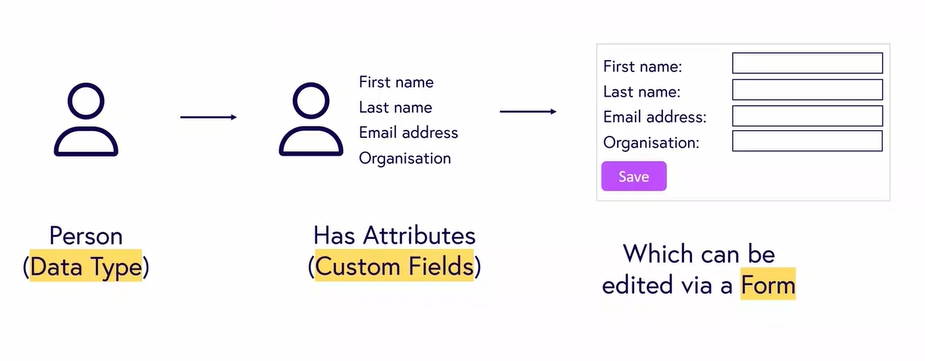
Putting that all together, our data type might be ‘Person’, and people will have different attributes which are stored as custom fields. For example, their First Name is stored in a field. These are then edited via a form; which might include fields to store First name, Last name, and Address.
Connections
Within your CRM, data can also be connected across and within different data types.
To give a real world example, your organisation may have a project that you’re responsible for delivering. This project could be connected to an Organisation that funds it, as well as an organisation that helps you to deliver it. Both of these connections can be stored in separate ‘Funder’ and ‘Partner’ connection fields, which connect the organisations’ CRM profiles to your project.
Your project will contain lots of events, which can also be connected to other data. An event may be connected to attendees through the core ‘Participant’ field, but also to your session leaders through a dedicated ‘Person’ connection field.
Connecting all of your data in this way makes it super simple to manage day to day, as you can use these connections to navigate through the CRM, but it also allows you to ask intelligent questions about your data; for example, give me the demographic information of all of the participants in events related to this funder in the last year.